Thimbleweed Park 2 dev blog

Sep 12, 2026

David here again!

In Thimbleweed Park 1, there was large puddle the actors walked through, and we saw splashing around their feet, and heard splashing for each step. I’m going to talk about how we did that by setting up room triggers and turning on a special animation layer in the actor’s animation file.

Triggers

In the Dinky engine, triggers are quadrilaterals on the screen, usually placed somewhere in the area where the actors are going to walk. When an actor enters a trigger, the triggerEnter() function is called, and when they exit the trigger, the triggerLeave() function is called.

Triggers are added using our room setup tool, Wimpy. We add a generic object, indicate it’s a trigger, and adjust the four corners of the quadrilateral to match the desired trigger area. More on this below.

Animation Layers

In my last blog post on animation, I mentioned we could have multiple layers for things like hats, heads, nose glasses. We also used layers for splashes.

In the above screenshot you can see all the layers that make up the basic Agent Ray animation, including one for eye blinks (the blink is made up of a few pixels which cover her eyes), eyes looking left or right, a collection of six heads that each have a different mouth shape (maybe we’ll go into lipsync in another blog), and near the bottom, you see the splash layer.

There’s also a layer near the bottom called _trigger. This has nothing to do with room triggers, but is a flag we can set to trigger a sound effect (footstep), or some other event we need synchronized with the animation.

The _floor layer is for reference only, and helps us align the actor to where the floor will be. I have it turned off in the above screen capture.

The splash animation is made up of three frames. We position the frames over the actor’s feet, timed to the moment the foot hits the ground (or water).

Here’s the splash animation of Agent Ray.

Trigger Code

Now that we have the animation working, here’s the code to turn on and off the splash layers on Agent Ray. splashTrigger is what I named the room trigger in Wimpy:

splashTrigger = {
	function triggerEnter(actor) {
		footstepsWater(actor)
	}
	function triggerLeave(actor) {
		footstepsNormal(actor)
	}
}

and elsewhere we have the actual footstep functions:

function footstepsNormal(actor) {
	actor.footstep_sound = actor.footstep_save
	actorShowLayer(actor, "splash", false)
}

function footstepsWater(actor) {
	actor.footstep_sound = SOUNDID(footstep_water)
	actorShowLayer(actor, "splash", true)
}

function footstepsGrass(actor) {
	actor.footstep_sound = SOUNDID(footstep_grass)
	actorShowLayer(actor, "splash", false)
}

Each actor has a default footstep, and we save that off in the footstep_save variable for each actor.

The actorShowLayer command turns on and off the specified layer.

I threw in another function above, footstepsGrass(), where I was testing out the sound of walking on grass and added another room trigger area over the grass outside the Nickel News.

Finally, we have a system function that is called when there’s a _trigger in the animation, as I described above. Again, this is a different kind of trigger from a room-defined trigger quadrilateral. For animation events, the _triggerEvent() function is called.

function _triggerEvent(actor, event) {
	if (event == "@step") {
		local sid = actor?.footstep_sound
		if (sid) {
			playSoundAt(sid, actor)
		}
	} else {
		if (is_function(actor?.triggerEvent, 1)) {
			actor.triggerEvent(event)
		}
	}
}

The event name in Aseprite for footstep _triggers is “@step”. If there are other event names in the animation, the else portion of the code is run, but only if the specified actor has its own triggerEvent code. For example, the Sheriff from Thimbleweed Park 1 had an animation of flipping a coin, and this is the code that’s triggered when that event is detected in his animation:

function triggerEvent(sound) {
	if (sound == "@coinFlip") playSoundAt(SOUNDID(coin_flip), sheriff)
}

Here’s what the splash animation looks and sounds like in the game. I don’t have a puddle here, but I’ve made the trigger quadrilaterals visible for you to see.

– David Fox
Read Comments (23)
Sep 2, 2026

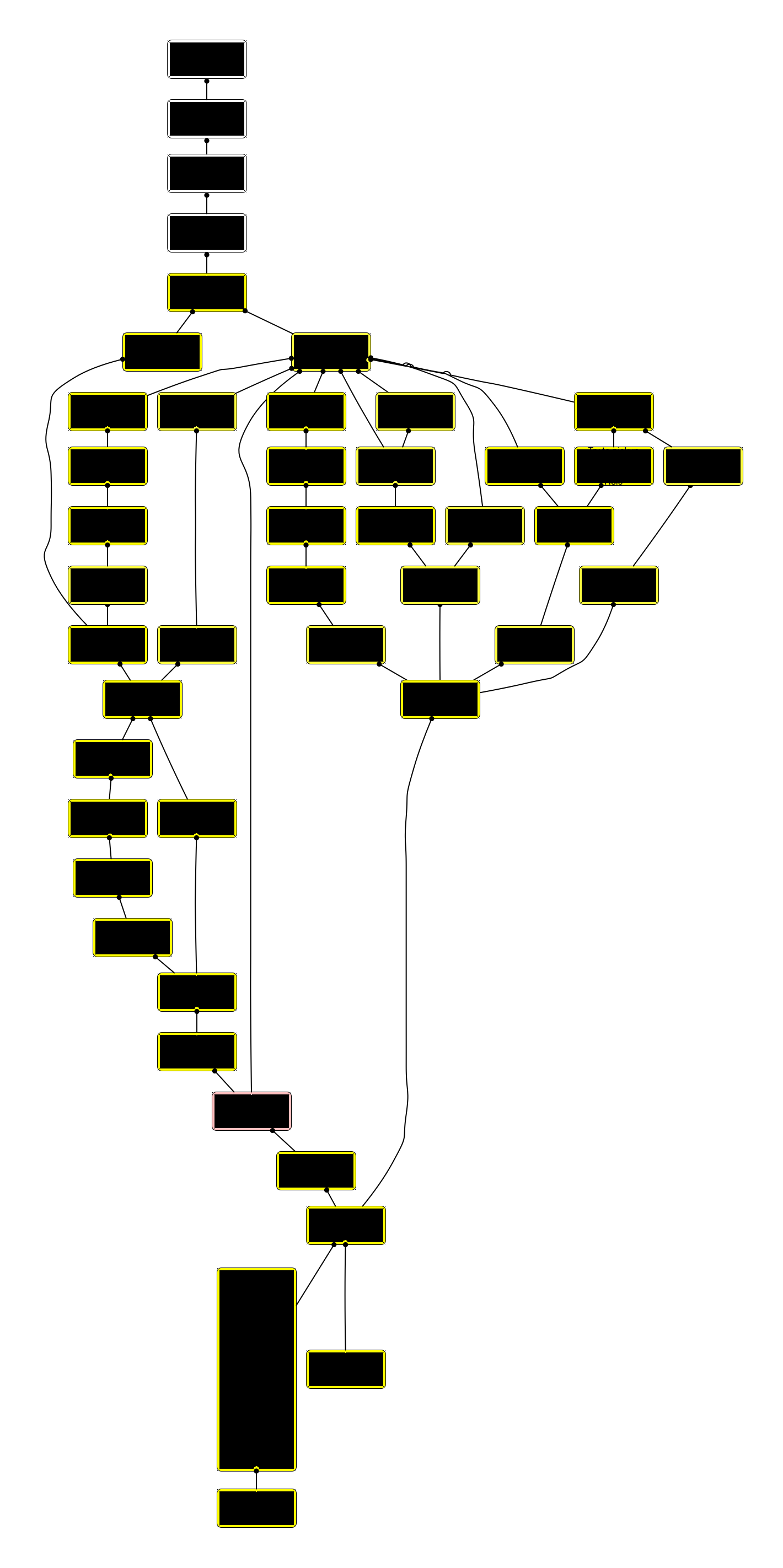
Here is the first draft of the Puzzle Dependency Chart for Thimbleweed Park 2.

The game is divided into four parts, and this is part 1 (and the simplest part).

Still some missing nodes to make some puzzles more complex, but it’s a solid first draft.

Green nodes are tutorial sections, yellow nodes are flashbacks, and red nodes are TBD nodes that need to be filled out in detail.

All sensitive information has been redacted for your protection.

How to read Puzzle Dependency Charts

Read Comments (53)
Aug 22, 2026

Big news. We got someone to help us edit the podcasts. Thanks to everyone who offered support and help.

First, the old podcasts are back. You can get them here:

Apple Podcasts

Spotify

Amazon Music

Here is Thimbleweed Park podcast #1 just to get your nostalgia going.

We’re going to start up the podcast again as soon as my people talk to David’s people and Gary’s people talk to my people. It might be a few weeks to get everything set up.

One suggestion I get a lot is wanting to hear from the other team members, so we we’ll do that more.

We’re also bringing back Friday Questions, so be on the look out for those.

– Ron

P.S. I redid the Thimbleweed Park website and added a newsletter sign-up. This isn’t for new dev blog posts, but larger events and news closer to release.

Read Comments (27)
Aug 18, 2026

David here!

This is my first blog post for the Thimbleweed Park 2 dev blog, and I hope not the last. I’m going to talk about character animation in the game, a bit about process and tools.

In Thimbleweed Park 1 (ok, it was never called that, just Thimbleweed Park, are we retconning the game name?), we used a home-grown (Ron-created) character animation program called Compy. It had some basic features, and emitted json files describing the animation sequences along with the individual cells that could be layered on top of each other to create the character animations you saw in the game. For example, Agent Ray’s body was separate from her head, so while her body was walking, we could independently animate her head and mouth. Likewise we had another layer for eye blinks, another for accessories (hats, nose glasses).

Continue reading →
Read Comments (62)
Aug 12, 2026

David, Gary and I really enjoyed doing the Thimbleweed Park 1 podcast and want to continue it for Thimbleweed Park 2, but there are a couple of issues.

First is where to host. I’m not a consumer of podcasts, so I don’t know all the ins-and-outs. I assume Dropbox isn’t a good idea.

The Thimbleweed Park 1 podcast was hosted on SoundCloud and for reason I don’t fully remember I had a free account, but a few years ago they started charging me so I pull them all down and saved them so I can re-post later.

For Thimbleweed Park 2 we need to find a place to host that 1) Doesn’t charge a lot of money and 2) doesn’t insert ads in the middle. I also don’t want to have to upload them to 5 different places, I want one place that all podcast apps can read from.

The second issue is they took a lot of time. It basically ate up half of my Saturday recording and editing, prepping, and uploading the podcast.

We need to find someone that will take on that job (paid). I’m not asking for volunteers so please don’t suggest yourself unless it is literally your day job.

I’d also like to upload them to YouTube, not as video podcasts, but just audio and maybe an pixel image of each of us when we are talking.

There are few (physics) podcasts I listen to that do this. It works well for me.

Stay tuned and we hope to start recording in the next month or so. Lots of fun design stuff to talk about.

Read Comments (57)
Aug 8, 2026

A few people have asked what the difference with the engine we used for Thimbleweed Park 1 and what we are using for Thimbleweed Park 2.

They are basically two different engines with a few similarities, mostly in the format of the room images.

Thimbleweed Park 1 used SDL for graphics and sound and a scripting language called Squirrel.

Squirrel is a good language, but it couldn’t do the code optimizing I wanted and was missing a few convenience features.

You had to ship your game with full source and it compiled it at run-time. I wanted it to emit byte code so I could run an optimization pass.

After Thimbleweed Park 1 I started working on a early version of Death by Scrolling (called Runner back then) and in a fit of insanity I wrote a new scripting language called Dinky. It compiled to byte-code and had an optimization pass. It was still 80% compatible with Squirrel, but I added some new features and it was a lot faster.

About this time the idea of Return to Monkey island was starting to become real so I started (with David’s help) the game Delores. It was going to serve as a test bed for porting Thimbleweed Park 1 to my new engine that we’d use for Return to Monkey Island.

Thimbleweed Park 1 used the SDL sound engine which is very limited and porting to mobile and consoles required re-writing the sound engine. I initially poo-poo’d using FMOD because it would cost $6000 to use it for Thimbleweed Park 1, but in the end I spent more than $6000 porting to all the different platforms. Penny-wise, pound-foolish.

So Delores used FMOD and it’s a dream.

I also teamed up again with Derek who I had worked with on DeathSpank and he removed SDL and began a new graphics back-end that would use Vulkan, Metal, DirectX, etc. It would make porting to other platforms a lot easier and allow for better use of shaders.

We started Return to Monkey Island and basically used the Delores Engine. The big change we had to make was supporting hires images. It was just scaling the rendering, but we had to add a lot of smart caching because the texture were a lot bigger than pixel art.

I then started working on Death by Scrolling again and used the Return to Monkey Island engine with a new tile map renderer.

Death by Scrolling shipped and then Thimbleweed Park 2 became a reality.

Back to the Return to Monkey Island engine. The changes were pretty simple since we just need to scale it for pixel art again.

The big changes were in the Dinky scripting code since I want to re-look at the UI and verbs. I wasn’t happy with Thimbleweed Park 1, Delores or Return to Monkey Island and wanted to try something new, kind of a hybrid between the best of the three.

But more on that later…

So, it’s a very different engine.

Thimbleweed Park 1 -> Runner -> Delores -> Return to Monkey Island -> RPGTBD -> Death by Scrolling -> Thimbleweed Park 2 -> TBD

Read Comments (45)
Aug 1, 2026

Welcome to the all new Thimbleweed Park 2 dev blog.

The response to our announcement has been overwhelming. Thanks so much for your enthusiasm. It keeps us going.

We hope to post at least once a week with all the happenings but no spoilers.

We’d like to get the podcast going again, but no promises. It was a lot of work each week.

I’ll post updates on Mastodon or you can use RSS like it’s 2004 or you can hit refresh obsessively.

We’d like to do Big Box versions, but we’re a long way from making any decisions.

The game will be on Steam and GOG for Mac, Windows and Linux. It will also be on Switch, Xbox and PlayStation.

iOS and Android are hard because premium (paid) games don’t do well unless we can get into Apple Arcade or Google Play Pass and being included in those is largely not up to us.

We’re not doing a Kickstarter as the game is already funded, but we would like to figure out ways to do fun things like the phonebook and other goodies.

Please don’t suggest we put it on retro platforms because while the game is pixel art it uses shaders, FMOD and other modern tech.

It will be translated into EFIGS and a few other languages. Only English is planned for voice recording.

Not happy with the colors on the dev blog, open to suggestions, but I’m stubborn.

– Ron

Read Comments (119)